组件:组件允许我们将 UI 划分为独立的、可重用的部分,并且可以对每个部分进行单独的思考。 把项目中的重复使用的UI做成一个独立的组件供项目各个位置使用。 例如:Element、Ant Design等UI,组件。我们也可以自己定义一些组件给自己项目使用。
定义组件
在项目的components目录下创建组件(vue文件)
template标签是必须的,script和style根据需要来
<template>
    <div class="header">
        我是头部
    </div>
</template>

<script>

</script>

<!-- scoped表示下面的样式只在当前组件有效 -->
<style scoped>
    .header {
        height: 50px;
        width: 100%;
        background-color: red;
    }
</style>
使用组件
<template>
  <!-- 第三步:显示组件 -->
  <Header />
</template>

<script>
// 第一步:引入组件
import Header from './components/Header.vue'

export default {
  data() {
    return {

    }
  },
  // 第二步:注入组件
  components:{
    Header
  }
}
</script>
组件嵌套
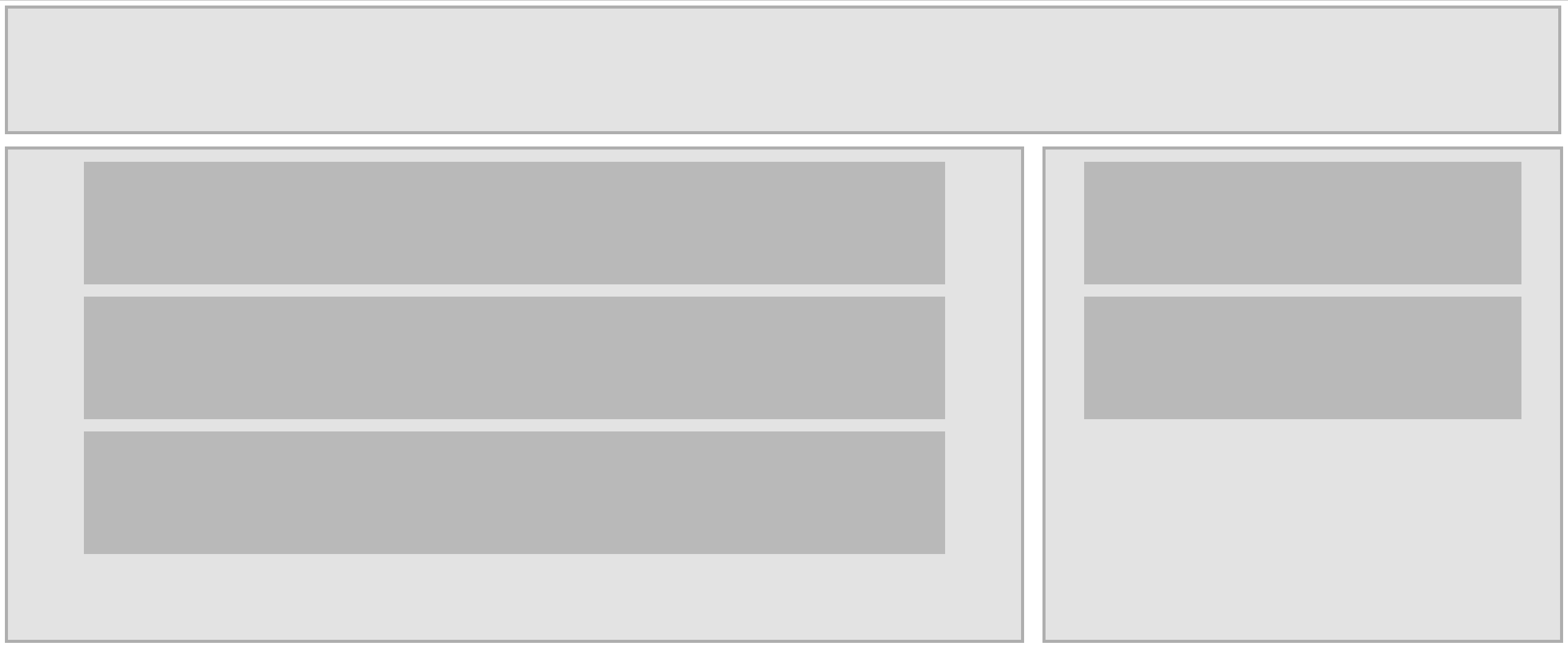
组件Header
<template>
    <div id="header"></div>
</template>

<style scoped>
    #header {
        width: 99.5%;
        height: 200px;
        background-color: #e3e3e3;
        border: 5px solid #aeaeae;
        margin-bottom: 20px;
    }
</style>
组件Main
组件Main中嵌套了组件Article
<template>
    <div id="main">
        <Article />
        <Article />
        <Article />
    </div>
</template>

<script>
    import Article from './Article.vue'
    export default{
        components:{
            Article
        }
    }
</script>

<style scoped>
    #main {
        width: 65%;
        height: 800px;
        background-color: #e3e3e3;
        border: 5px solid #aeaeae;
        float: left;
    }
</style>
组件Article
<template>
    <div id="article"></div>
</template>

<style scoped>
    #article {
        width: 85%;
        margin: 20px auto;
        height: 200px;
        background-color: #b9b9b9;
    }
</style>
组件Aside
组件Aside中嵌套了组件Article
<template>
    <div id="Aside">
        <Article />
        <Article />
    </div>
</template>

<script>
    import Article from './Article.vue'
    export default{
        components:{
            Article
        }
    }
</script>

<style scoped>
    #Aside {
        width: 33%;
        height: 800px;
        background-color: #e3e3e3;
        border: 5px solid #aeaeae;
        float: right;
    }
</style>
App.vue
选项式
<template>
  <Header />
  <Main />
  <Aside />
</template>

<script>
  import Header from './components/Header.vue';
  import Main from './components/Main.vue';
  import Aside from './components/Aside.vue';

  export default {
    components: {
      Header,
      Main,
      Aside
    }
  }
</script>
组合式
<template>
    <Header/>
    <Main/>
    <Aside />
</template>

<script setup>
    import Main from './components/t4/Main.vue';
    import Aside from './components/t4/Aside.vue';
    import Header from './components/t4/Header.vue';


</script>
全局组件
全局组件可以在页面的任何组件中引用,不需要每个页面都引入一遍
组件
<template>
    <div id="header"></div>
</template>

<style scoped>
    #header {
        width: 99.5%;
        height: 200px;
        background-color: #e3e3e3;
        border: 5px solid #aeaeae;
        margin-bottom: 20px;
    }
</style>
main.js
import { createApp } from 'vue'
import App from './App.vue'

// 引入组件
import Header from './components/Header.vue'

// createApp(App).mount('#app') //原来的的样子

const app = createApp(App)
//注册组件
app.component('Header',Header)

app.mount('#app')
组件数据传递
父组件传给子组件
父组件
向发送数据的子组件上加上属性,属性名自拟,前面加冒号可以传递data中的动态数据。
选项式
<template>
    <h1>我是父组件</h1>
    <Child msg="你好儿子" :msg2="message" :kc="kc" :user="user"/>
</template>

<script>
    import Child from './Child.vue'
    export default{
        data(){
            return {
                message: "儿子这是动态数据",
                kc: ['java','Python','javascript'],
                user: {
                    username: '张三',
                    age: 20
                }
            }
        },
        components: {
            Child
        }
    }
</script>
组合式
<template>
    <h1>我是父组件</h1>
    <Child msg="你好儿子" :msg2="message" :kc="kc" :user="user"/>
</template>

<script setup>
    import { ref,reactive } from 'vue';
    import Child from './Child.vue'

    let message = ref("儿子这是动态数据");
    let kc = reactive(['java','Python','javascript']);
    let user = reactive({
        username: '张三',
         age: 20
    })

</script>
子组件
props属性接受父组件发过来的数据
选项式
<template>
    <h1>我是子组件</h1>
    <h3>子组件接受父亲的数据:{{ msg }}</h3>
    <h3>子组件接受父亲的动态数据:{{ msg2 }}</h3>
    <ul>
        <li v-for="(item,index) in kc" :key="index">{{ item }}</li>
    </ul>
    <p>{{ user.username }}</p>
    <p>{{ user.age }}</p>
</template>

<script>
    export default{
        data(){
            return {

            }
        },
        props:['msg','msg2','kc','user'],
        mounted(){
            console.log(this.$props.msg)
        }
    }
</script>
组合式
<template>
    <h1>我是子组件</h1>
    <h3>子组件接受父亲的数据:{{ msg }}</h3>
    <h3>子组件接受父亲的动态数据:{{ msg2 }}</h3>
    <ul>
        <li v-for="(item,index) in kc" :key="index">{{ item }}</li>
    </ul>
    <p>{{ user.username }}</p>
    <p>{{ user.age }}</p>
</template>

<script setup>
    import { onMounted } from 'vue';
    const props = defineProps(['msg','msg2','kc','user'])
    onMounted(()=>{
        console.log(props.user)
    })
</script>
props中的数据校验
子组件
选项式
<template>
    <h1>我是子组件</h1>
    <p>{{ num }}</p>
    <p>{{ count }}</p>
    <ul>
        <li v-for="(item,index) in kc" :key="index">{{ item }}</li>
    </ul>
</template>

<script>
    export default{
        props:{
            // 数据类型校验,String、Number、Array、Object
            num: {
                type: Number,
                //必须传
                required: true
            },
            // 默认值,父组件没有传值可以有默认值
            count: {
                default: 1
            },
            //对象默认值
            kc: {
                default(){
                    return ['空']
                }
            }
        }
    }
</script>
组合式
<template>
    <h1>我是子组件</h1>
    <h3>子组件接受父亲的数据:{{ msg }}</h3>
    <h3>子组件接受父亲的动态数据:{{ msg2 }}</h3>
    <ul>
        <li v-for="(item,index) in kc" :key="index">{{ item }}</li>
    </ul>
    <p>{{ user.username }}</p>
    <p>{{ user.age }}</p>
</template>

<script setup>
    import { onMounted } from 'vue';
     // 数据类型校验,String、Number、Array、Object
    const props = defineProps({
        msg: String,
        msg2: String,
        kc: Array,
        user: Object
    })
    onMounted(()=>{
        console.log(props.user)
    })
</script>
子组件传给父子组件
子组件传给父子组件数据,利用自定义事件实现
案例
子组件
选项式
<template>

    <h1>我是子组件</h1>
    <button @click="test">点击向父组件传参数</button>

</template>

<script>
    export default{
        data(){
            return {

            }
        },
        emits: ['testEvent'],
        methods:{
            test(){
	            // testEvent为自定事件,后面的为需要传递的数据
                this.$emit('testEvent','你好爸爸')
            }
        }
    }
</script>
组合式
<template>
    <h1>我是子组件</h1>
    <button @click="test">点击向父组件传参数</button>
    <button @click="$emit('testEvent2','你好')">点击向父组件传参数</button>
</template>

<script setup>
    const emit = defineEmits(['testEvent','testEvent2']);
    function test(){
        emit('testEvent','你好爸爸')
    }
</script>
父组件
选项式
<template>

    <h1>我是父组件</h1>
    <h3>来自子组件的数据:{{ msg }}</h3>
    <Child @testEvent="p_test"/>

</template>

<script>
    import Child from './Child.vue'
    export default{
        data(){
            return {
                msg: ""
            }
        },
        components: {
            Child
        },
        methods: {
            p_test(data){
                //data 为来自子组件的数据
                this.msg = data
            }
        }
    }
</script>
组合式
<template>

    <h1>我是父组件</h1>
    <h3>来自子组件的数据:{{ msg }}</h3>
    <h3>来自子组件的数据:{{ msg2 }}</h3>
    <Child @testEvent="p_test" @testEvent2="p_test2"/>

</template>

<script setup>
    import { ref } from 'vue';
    import Child from './Child.vue'

    let msg = ref('');
    function p_test(data){
        msg.value = data
    }
    let msg2 = ref('');
    function p_test2(data){
        msg2.value = data
    }
</script>
结合v-model
子组件
选项式
<template>

    <h1>我是子组件</h1>
    <input type="text" v-model="msg">

</template>

<script>
    export default{
        data(){
            return {
                msg: ""
            }
        },
        emits: ['msgEvent'],
        // 侦听
        watch: {
            msg(newValue,oldValue){
                this.$emit("msgEvent",newValue)
            }
        }
    }
</script>
组合式1
<template>

    <h1>我是子组件</h1>
    <input :value="modelValue" @input="$emit('update:modelValue', $event.target.value)">

</template>

<script setup>
    const props = defineProps(["modelValue"]);
    const emit = defineEmits(["update:modelValue"]);
</script>
组合式2
<template>
    <h1>我是子组件</h1>
    <input v-model="test">
</template>

<script setup>
    const test = defineModel()
</script>
父组件
<template>

    <h1>我是父组件</h1>
    <h3>来自子组件的数据:{{ msg }}</h3>
    <Child @msgEvent="p_test"/>

</template>

<script>
    import Child from './Child.vue'
    export default{
        data(){
            return {
                msg: ""
            }
        },
        components: {
            Child
        },
        methods: {
            p_test(data){
                //data 为来自子组件的数据
                this.msg = data
            }
        }
    }
</script>
组合式1
<template>
    <h1>我是父组件</h1>
    <h3>来自子组件的数据:{{ inputValue }}</h3>
    <Child v-model="inputValue"/>
</template>

<script setup>
    import Child from './Child.vue'
    import { ref } from "vue";
    const inputValue = ref();
</script>
组合式2
<template>
    <h1>我是父组件</h1>
    <h3>来自子组件的数据:{{ msg }}</h3>
    <Child v-model="msg"/>
</template>

<script setup>
    import Child from './Child.vue'
    import { ref } from "vue";

    const msg = ref();
</script>