创建Vue项目
必要条件:电脑先装好node.js,去官网下载node.js 地址:https://nodejs.org/en/download 下载LTS(长期支持版) 安装过程一直下一步即可
安装完成后打开cmd查看node.js版本
D:\code\vscodeProjects>node -v
v20.10.0

D:\code\vscodeProjects>npm -v
10.2.3
打开cmd进入代码存储的位置执行如下命令
npm create vue@latest
第一次执行可能需要你安装create-vue,输入y即可安装,需要一点时间
第一步会让你输入项目的名称,这里我输入:vue-demo 回车下一步。 之后每一步都会让你选择一个对应的功能,默认是“否”,如果想要对应的功能手动输入“是”,选好后回车下一步。
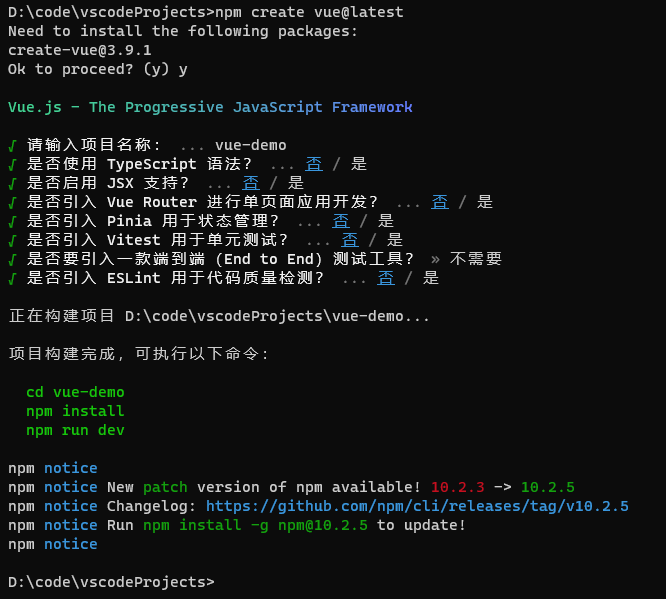
第一次运行项目
- cmd进入项目目录下
- 执行 npm install (这一步会生成一个node_modules的目录)
- 运行项目:npm run dev
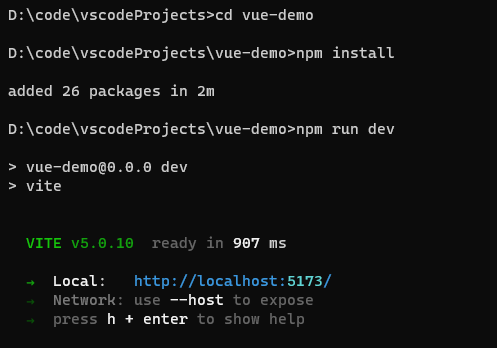 浏览器输入url:http://localhost:5173
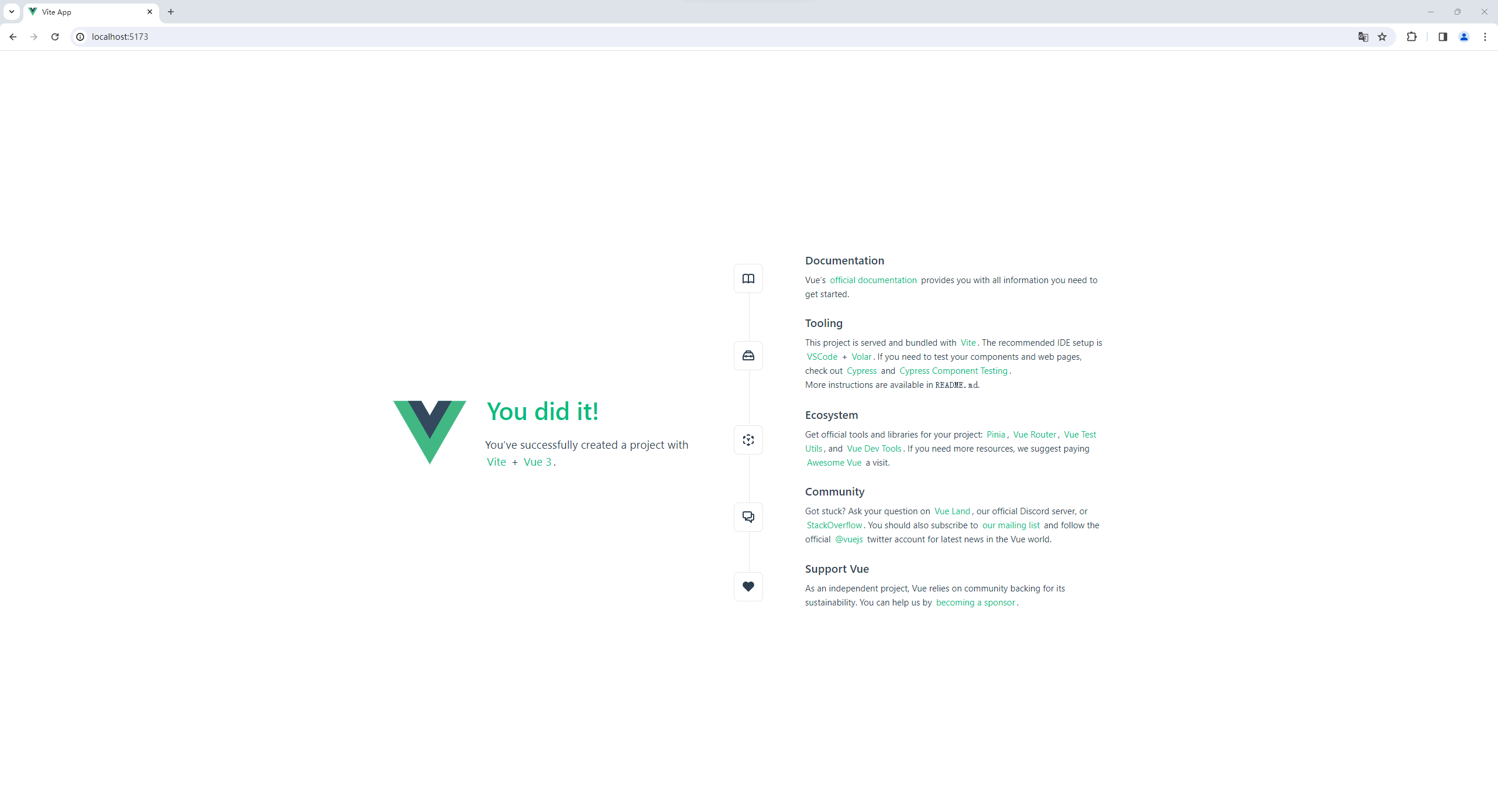 创建完成
创建完成
开发工具
推荐:Visual Studio Code + Volar 扩展
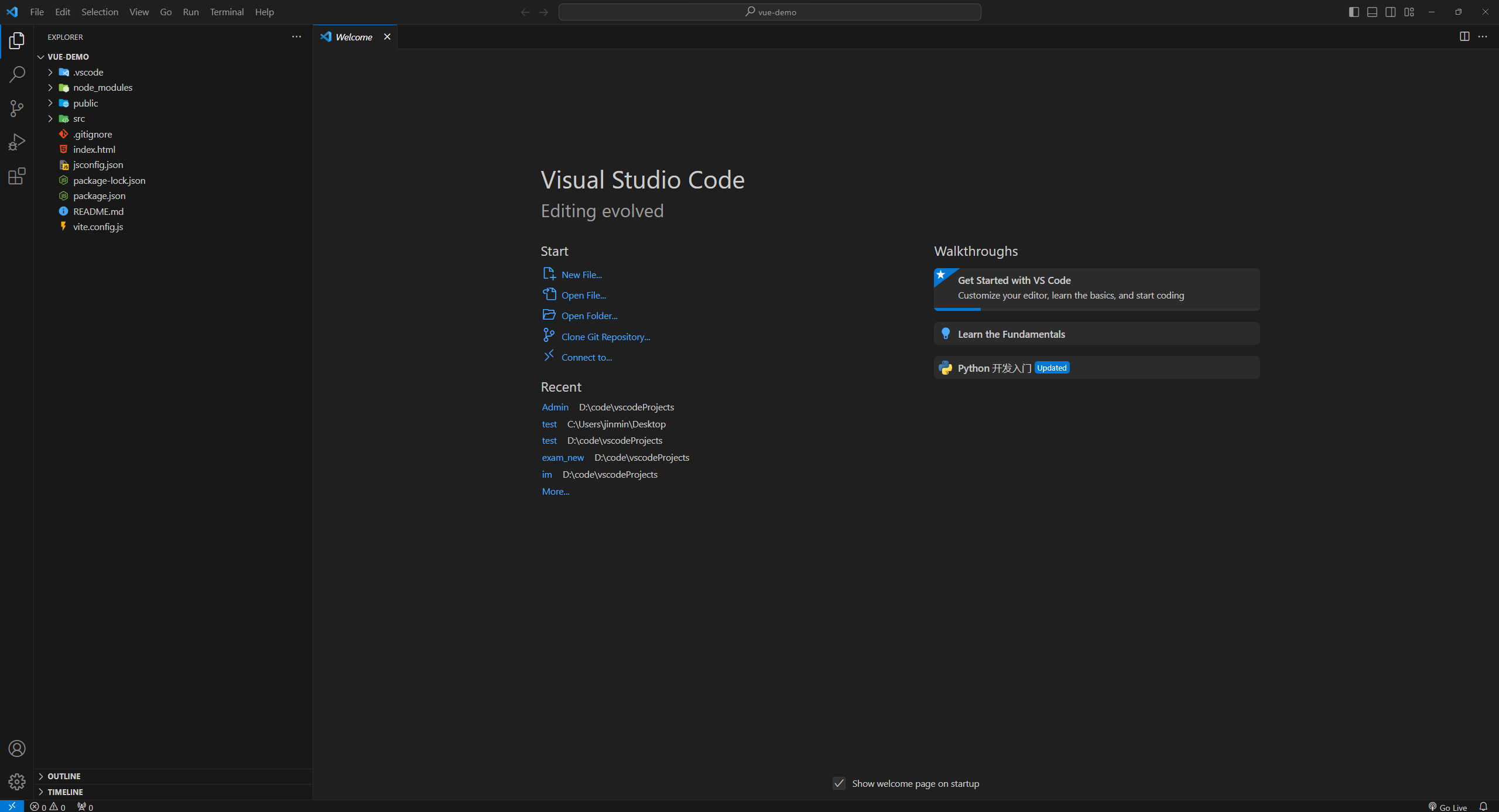
项目结构
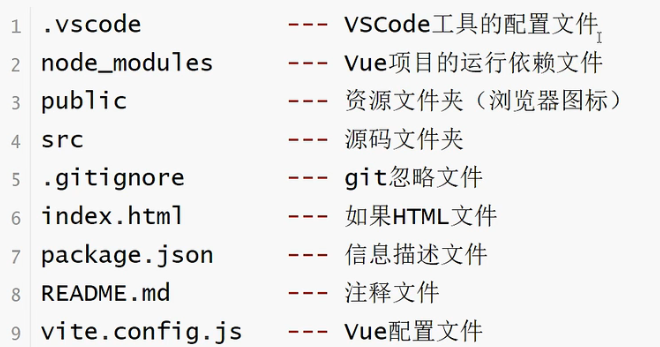
项目准备
vue项目创建完成后有一些默认的代码,初学者为了避免干扰建议删除
- 删除components下面的所有文件
- 删除App.vue里面的代码留下如下格式
<template>

</template>

<script>

</script>- 删除assets下的所有文件
- 删除main.js中导入的main.css样式,保留如下结果
import { createApp } from 'vue'
import App from './App.vue'

createApp(App).mount('#app')
模板语法
文本插值
选项式
<template>
  <!-- 插值表达式{{ key }} -->
  <h1>{{ message }}</h1>
  <h1>{{ num }}</h1>
</template>

<script>
export default {
  data() {
    return {
      message: 'Hello World!',
      num: 10
    }
  }
}
</script>
组合式
<template>
 <h1>{{message}}</h1>
 <h1>{{num}}</h1>
</template>

<script setup>
    import {ref} from 'vue';

    let message = "Hello World!";
    //通过ref定义的数据具有响应式效果
    let num = ref(10);

</script>

<style scoped>

</style>
文本插值中JavaScript 表达式
插值表达式支持单一有结果的JavaScript表达式
选项式
<template>
  <h1>{{ num + 1 }}</h1>
  <h1>{{ sex==1? '男':'女' }}</h1>
</template>

<script>
export default {
  data() {
    return {
      num: 10,
      sex: 1
    }
  }
}
</script>
组合式
<template>
    <h1>{{num+1}}</h1>
    <h1>{{sex==1?'男':'女'}}</h1>
</template>

<script setup>
    import {ref} from 'vue';
    let num = ref(10);
    let sex = ref(1);
</script>

<style scoped>

</style>
HTML插值
v-html支持在一个标签中插入一段html代码
选项式
<template>
  <div>{{ rawHtml }}</div>
  <div v-html="rawHtml"></div>
</template>

<script>
export default {
  data() {
    return {
      rawHtml: '<h1 style="color: red;">你好</h1>'
    }
  }
}
</script>
组合式
<template>
    <div>{{ rawHtml }}</div>
    <div v-html="rawHtml"></div>
</template>

<script setup>
    import {ref} from 'vue';

    let rawHtml = ref('<h1 style="color: red;">你好</h1>')
</script>
属性绑定(v-bind)
<template>
  <!-- {{  }}不能绑定属性,下面的代码属性绑定无效 -->
  <h1 class="{{ myClass }}">你好</h1>
  <!-- v-bind:属性 -->
  <h1 v-bind:id="myId" v-bind:class="myClass">你好</h1>
  <a v-bind:href="baidu">百度一下</a><br>
  <!-- 布尔类型 -->
  <button v-bind:disabled="isClick">点击</button>
  <!-- 一次绑定多个属性 -->
  <h1 v-bind="attrs">多个属性</h1>
  <!-- v-bind简写方式,省略掉v-bind-->
  <h1 :class="myClass">简写</h1>
</template>

<script>
export default {
  data() {
    return {
      myClass: 'active',
      myId: 'title',
      baidu: 'https://www.baidu.com',
      isClick: true,
      attrs: {
        id: 'box',
        class: 'active'
      }
    }
  }
}
</script>

<style>
  .active {
    color: red;
  }
  #title {
    background-color: blue;
  }
</style>
组合式
<template>
    <!-- {{  }}不能绑定属性,下面的代码属性绑定无效 -->
    <h1 class="{{ data.myClass }}">你好</h1>
    <!-- v-bind:属性 -->
    <h1 v-bind:id="data.myId" v-bind:class="data.myClass">你好</h1>
    <a v-bind:href="data.baidu">百度一下</a><br>
    <!-- 布尔类型 -->
    <button v-bind:disabled="data.isClick">点击</button>
    <!-- 一次绑定多个属性 -->
    <h1 v-bind="data.attrs">多个属性</h1>
    <!-- v-bind简写方式,省略掉v-bind-->
    <h1 :class="data.myClass">简写</h1>
  </template>

  <script setup>
    import {reactive} from 'vue';
    // reactive与ref类似都有响应式效果,reactive适合对象类型数据
    let data = reactive({
        myClass: 'active',
        myId: 'title',
        baidu: 'https://www.baidu.com',
        isClick: true,
        attrs: {
            id: 'box',
            class: 'active'
        }
    })
  </script>

  <style scoped>
    .active {
      color: red;
    }
    #title {
      background-color: blue;
    }
  </style>
条件渲染
v-if&v-show
v-if:是“真实的”按条件渲染,因为它确保了在切换时,条件区块内的事件监听器和子组件都会被销毁与重建。系统开销相对较大,适合不经常切换的场景。 v-show:元素无论初始条件如何,始终会被渲染,只有 CSS display 属性会被切换。适合频繁切换的场景
选项式
<template>
    <h1>v-if</h1>
    <!-- isShow如果是false,那么下面的h1将不被创建和渲染 -->
    <h1 v-if="isShow">我是根据条件出现的</h1>
    <h1 v-else>上面的没有出来,我出来</h1>
    <!-- v-else-if -->
    <h1 v-if="score >= 90">优秀</h1>
    <h1 v-else-if="score >= 70">良好</h1>
    <h1 v-else-if="score >= 60">合格</h1>
    <h1 v-else>不合格</h1>
    <!-- v-show -->
    <h1 v-show="isShow">v-show测试</h1>
</template>

<script>
export default {
  data() {
    return {
     isShow: false,
     score: 85
    }
  }
}
</script>
组合式
<template>
    <h1>v-if</h1>
    <!-- isShow如果是false,那么下面的h1将不被创建和渲染,if if-else必须紧跟在一起 -->
    <h1 v-if="isShow">我是根据条件出现的</h1>
    <h1 v-else>上面的没有出来,我出来</h1>
    <!-- v-else-if -->
    <h1 v-if="score >= 90">优秀</h1>
    <h1 v-else-if="score >= 70">良好</h1>
    <h1 v-else-if="score >= 60">合格</h1>
    <h1 v-else>不合格</h1>
    <!-- v-show -->
    <h1 v-show="isShow">v-show测试</h1>
</template>

<script setup>
    import {ref} from 'vue';
    let isShow = ref(false);
    let score = ref(85);
</script>
列表渲染
选项式
<template>
  <table border="1" width="500px">
    <thead>
      <tr>
        <th>序号</th>
        <th>用户编号</th>
        <th>用户名称</th>
        <th>用户性别</th>
      </tr>
    </thead>
    <tbody>
      <!-- 如果不许需要序号 -->
      <!-- <tr v-for="item in list"> -->
      <tr v-for="(item,index) in list">
        <td>{{ index }}</td>
        <td>{{ item.userId }}</td>
        <td>{{ item.username }}</td>
        <td>{{ item.sex }}</td>
      </tr>
    </tbody>
  </table>
  <!-- 循环对象 -->
  <ul>
    <li v-for="(value,key,index) in user">{{index}} : {{ key }} : {{ value }}</li>
  </ul>
</template>

<script>
export default {
  data() {
    return {
      list: [
        {
          userId: 10001,
          username: '张三',
          sex: '男'
        },
        {
          userId: 10002,
          username: '李四',
          sex: '女'
        },
        {
          userId: 10003,
          username: '王五',
          sex: '男'
        }
      ],
      user: {id: 1000,name: '张三',age: 20}
    }
  }
}
</script>
组合式
<template>
    <table border="1" width="500px">
      <thead>
        <tr>
          <th>序号</th>
          <th>用户编号</th>
          <th>用户名称</th>
          <th>用户性别</th>
        </tr>
      </thead>
      <tbody>
        <!-- 如果不许需要序号 -->
        <!-- <tr v-for="item in list"> -->
        <tr v-for="(item,index) in userList.list" :key="item.userId">
          <td>{{ index }}</td>
          <td>{{ item.userId }}</td>
          <td>{{ item.username }}</td>
          <td>{{ item.sex }}</td>
        </tr>
      </tbody>
    </table>
    <!-- 循环对象 -->
    <ul>
      <li v-for="(value,key,index) in user">{{index}} : {{ key }} : {{ value }}</li>
    </ul>
  </template>

  <script setup>
    import {reactive} from 'vue';

    let userList = reactive({
        list: [
          {
            userId: 10001,
            username: '张三',
            sex: '男'
          },
          {
            userId: 10002,
            username: '李四',
            sex: '女'
          },
          {
            userId: 10003,
            username: '王五',
            sex: '男'
          }
        ]
    });

    let user = reactive({
        id: 1000,
        name: '张三',
        age: 20
    });

  </script>
通过 key 管理状态
vue推荐给每个循环出来的列表加上一个key,这样可以提高列表渲染的性能,防止列表顺序发生改变的时候重新渲染列表影响性能。
<template>
  <table border="1" width="500px">
    <thead>
      <tr>
        <th>序号</th>
        <th>用户编号</th>
        <th>用户名称</th>
        <th>用户性别</th>
      </tr>
    </thead>
    <tbody>
      <!-- 如果后端发过来的数据没有id,可以直接用index作为key -->
      <tr v-for="(item,index) in list" :key="item.userId">
        <td>{{ index }}</td>
        <td>{{ item.userId }}</td>
        <td>{{ item.username }}</td>
        <td>{{ item.sex }}</td>
      </tr>
    </tbody>
  </table>
</template>

<script>
export default {
  data() {
    return {
      list: [
        {
          userId: 10001,
          username: '张三',
          sex: '男'
        },
        {
          userId: 10002,
          username: '李四',
          sex: '女'
        },
        {
          userId: 10003,
          username: '王五',
          sex: '男'
        }
      ]
    }
  }
}
</script>